
|

|
| ||||||||


|
|


| | | ||||||
|
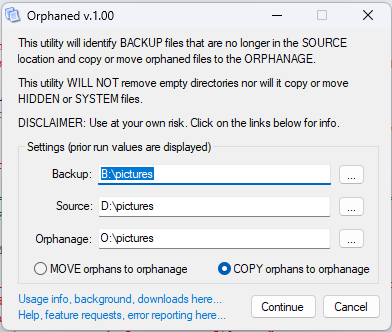
IntroductionThe utility is a orphan (re)locator. An orphan is a file that exists in your BACKUP but no longer has a parent in the SOURCE/PRODUCTION/LIVE location and can be moved to the ORPHANAGE, cleaning up the BACKUP but without deleting the orphan(s). Can be called directly of via a command line call. Once all arguments are collected and confirmed, Orphaned loads all the filenames located in BACKUP and SOURCE into arrays. These arrays are compared using BACKUP as the children and the SOURCE as the parent. Children with no matching parent are identified as an orphan. Once search has concluded, housing (move or copy) the orphaned children begins according to defined user operation. It's Windows-based, open source (GNU), and solely written, maintained, hosted, and supported by me, Sean Shrum. Source code is written with AutoIT (.au3) and the most recent version can be found via the source link in the navbar above. If you're just looking for the latest binary build, it can be downloaded from the binary link in the navbar above. BackgroundI have a NAS box (my 3rd) with decades of files that I have moved, renamed, or just plain deleted years ago that no longer exist anymore in my production devices and wanted to clear up the space but always feared that I my have a file or two in the I might need. This gives me the ability to relocate those files to a separate folder to give them a quick look over before I decide whether to permanently delete them. Usage - EXE launchRunning Orphaned directly without command line parameters will presented the user with a SETTINGS dialog into which they can select the BACKUP, SOURCE, and ORPHANAGE location and elect to MOVE or COPY orphans:
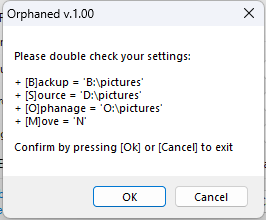
If all arguments are present, the final CONFIRMATION dialog is displayed:
If you are pulling files located in a subdirectory (as in the above Source), make sure to create the corresponded upper level ORPHANAGE destination like in the above example. Failing to do this step will result in files overlapping or even overwriting prior different orphaned files. This is a mess you don't want (some might not care as these are orphans anyways). Usage - Command lineYou can make command line calls and bypass the settings dialog. Here is a sample call with the same above parameters and result:
For pathnames with spaces, wrap the argument in dbl-quotes:
If all arguments are present, the CONFIRMATION dialog will still display. As part of a command line call, this window will timeout in 20 seconds and will continue with the displayed settings. If a parameter is missing from the command line, Orphaned will prompt for the missing value before proceeding as if the argument was part of the initiating command line call (20s confirmation timeout will still be in effect). Usage - Key pointsRegardless of launch method, here are some key points to be aware of:
FAQsQ. Will Orphaned remove subfolders that become empty after a move?
Q. I moved files by mistake. What do I do?
| | ||||||
| | | ||||||

|
|