 | Shuffler

| Shuffler | | File randomizing utility for copying or moving files from one location to another including MSC (Mass Storage Class) compliant devices. Great for mixing up audio/video/photo files to things like the iPod Shuffle, Rio Carbon, as well as other MSC compliant devices like cell phones, flash drives, and gaming consoles. Supports command line calls, nested subfolders and destination merging. | | |
Shuffler is
a file shuffling & loading application that can be used to copy or move
any user-definable files such as audio, video, pictures, etc. from folders or play
list sources to another location such as MSC media inculding flash/USB/Firewire drives, memory sticks,
mini/micro/SD cards, CF, etc. for use in cell phones, PPCs (Pocket PCs),
portable gaming consoles, MP3 players, PMPs (Personal Media Players), and many
more. The main goal of this program is to act as the middleman in
transferring files randomly to other folders and/or drives.
 | | 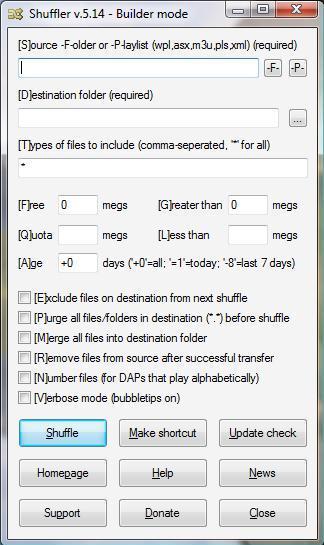 | | Windows XP | | Windows Vista |
It's Windows-based, open source (GNU),
and solely written, maintained, hosted, and supported by me, Sean Shrum. If you're just looking for the latest binary build, it can be downloaded from here
(~240 kb).
Online help is available here or by pressing 'Help' in Shuffler's Builder GUI or by typing "?" in your command line call.
Latest distributions as well as complete list of changes, additions, fixes, etc. that were implemented in each release
can be found in Shuffler's file area.
Source written in AutoIT. Current binary compiled with AutoIT 3.1.1.117 beta (or greater). Click here to get my list of (and links to) AutoIT tools.
More information concerning my AutoRun utility for automating program execution can be found here.
Information pertaining to the Windows Media Player Playlist Exporter including docs on setting up Shuffler to work with this utility can be found here.
If you like Shuffler, try to send a
$5 bucks to feed my Dr. Pepper / digital toys fund. This will help motivate me to continue development on this project and prove to my wife that I can make a buck doing open source programming. Links to Paypal and my address can be found here.
FeaturesHere is a listing of features in the current version of Shuffler:
- GUI and command line support
Run Shuffler with or without arguments. Builder mode helps users to create the right command line by providing a GUI to input choice selections. Those more experienced with shuffler and batch scripting can make use the command line interface to run Shuffler directly.
- Automatic shuffling to MSC compliant devices
When used with my AutoRun, calls to shuffler can be placed into a batch file and automatically launched as soon as the MSC device is plugged in.
- Directory and play list support
Point Shuffler at a folder (of folders and files) or use a play list (m3u,pls,wpl,asx) as your file source.
- WMP (Windows Media Player) integration
When used in conjunction with my Windows Media Player Playlist Export utility (WMPPLEXP; also written by me), you can select play list sources directly from Windows Media Player prior to each shuffle. Defaults to the last used source.
- Run silent, run deep
By disabling verbose mode, Shuffler will run without annoying you with screens and dialogs you don't want to see. Be careful thou, I've pulled my device WHILE it was still shuffling. :-)
- Exclude prior
Excludes files that were just on your MSC device prior to Shuffling; this means no repeats between shuffles.
- File type filtering
User definable file type filtering so only those files you want / your DAP supports are transferred.
- Remove from source
Allows you to move (versus copy) files to your device.
Great for things like Podcasts. Use this feature with the purge option and
a Podcast downloader like
Juice to
always get fresh content on you mobile storage device.
- Free
Allows you to define a set amount of space to keep free on the destination after shuffling completes; great if you plan on storing data files to your destination later.
- Quota
Allows for a fixed amount of space to be used each time; in tight squeezes, reserve takes
precedence. Example: Quota=100 / Reserve= 50 / Free Space = 125 -> Transfer = 75.
- File size filtering
Allows you to set the 'greater than' and 'less than' sizes to include in your shuffle.
- File age filtering
Allows you to define a
day-age filter using >, <, or =.
- Numeric file renaming
Prepends the filename with a 3 digit number; for users that want to playback files in random order but don't have random playback capabilities on their players (playbacks in alphanumeric order); I call it 'psuedo-random-playback'.
Background
Being an iPod Shuffle user myself (cuz some two-bit thief made off with my 20 gig Rio Karma), one of the original goals of this project was to get away from having to use what I termed iPuke (my pet name for iTunes). The other goal was to create a automatic file loader that would randomly transfer files (songs) without me having to do anything more then just
attaching my DAP to my PC.
While I originally wrote the application for my iPod Shuffle, I realized that it could be used with any files you wanted to randomly copy/move to another folder and/or drive. This included all MSC compliant devices besides just DAPs including cell phones, flash drives, and even gaming consoles like the Sony PSP...anything that shows up as a drive in Windows!
Actual sync time depends on your size quota, # of files, and USB connection speed. Once the sync completes, the user is alerted via a message box and the sync flag is set to 1 (sync complete). No more sync sessions are run until the device is disconnected from the PC, which in turn resets the sync flag back to 0. On my P-4 1.6GHz 1 gig PC, it takes
590 seconds (~10 minutes) to move 185 files; a total of 814 megs. This averages out to about
1.4 meg/sec over a USB 2.0 connection to a USB 2.0 compliant device. | |


